TMP register & RCA tracking
Every TMP and RCA reference, tracked
What it solves
References and expiries that don't slip
Plans go to several RCAs, each with its own portal and reference numbers. RFIs come back, plans are resubmitted, and approvals expire while shifts are still booked.
- Reference numbers live in spreadsheets and email subject lines.
- The same RFI reasons keep coming back.
- A plan expires while crews are still booked to work under it.
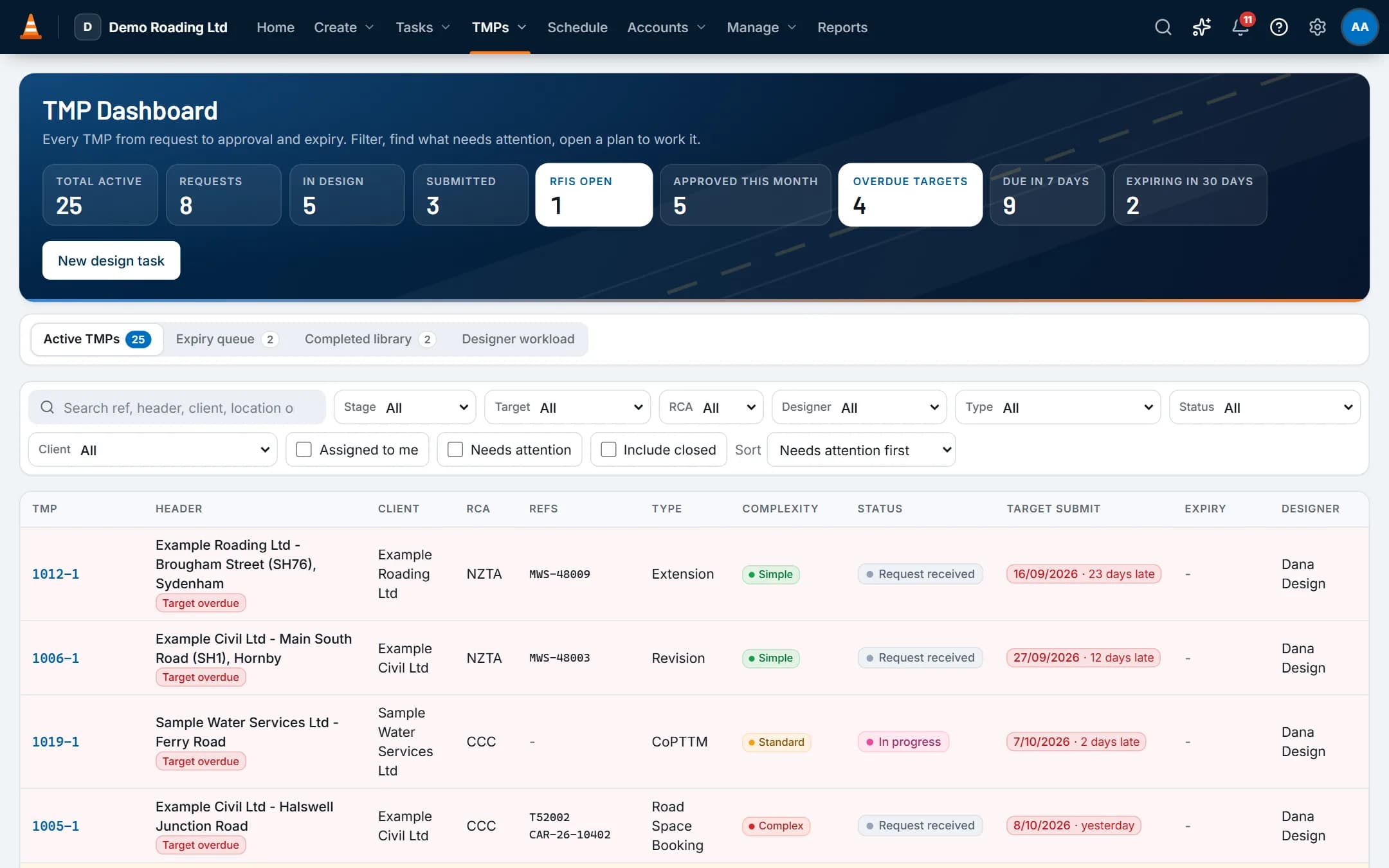
Screens show the real app with fictional demo data.
How it works
Step by step
The request becomes a task
A design request is a Design or Design & Delivery task. Its TMP tab holds the TMP type, complexity, RCA, target submit date, work dates and the worksite area on a map.Submit and record the reference
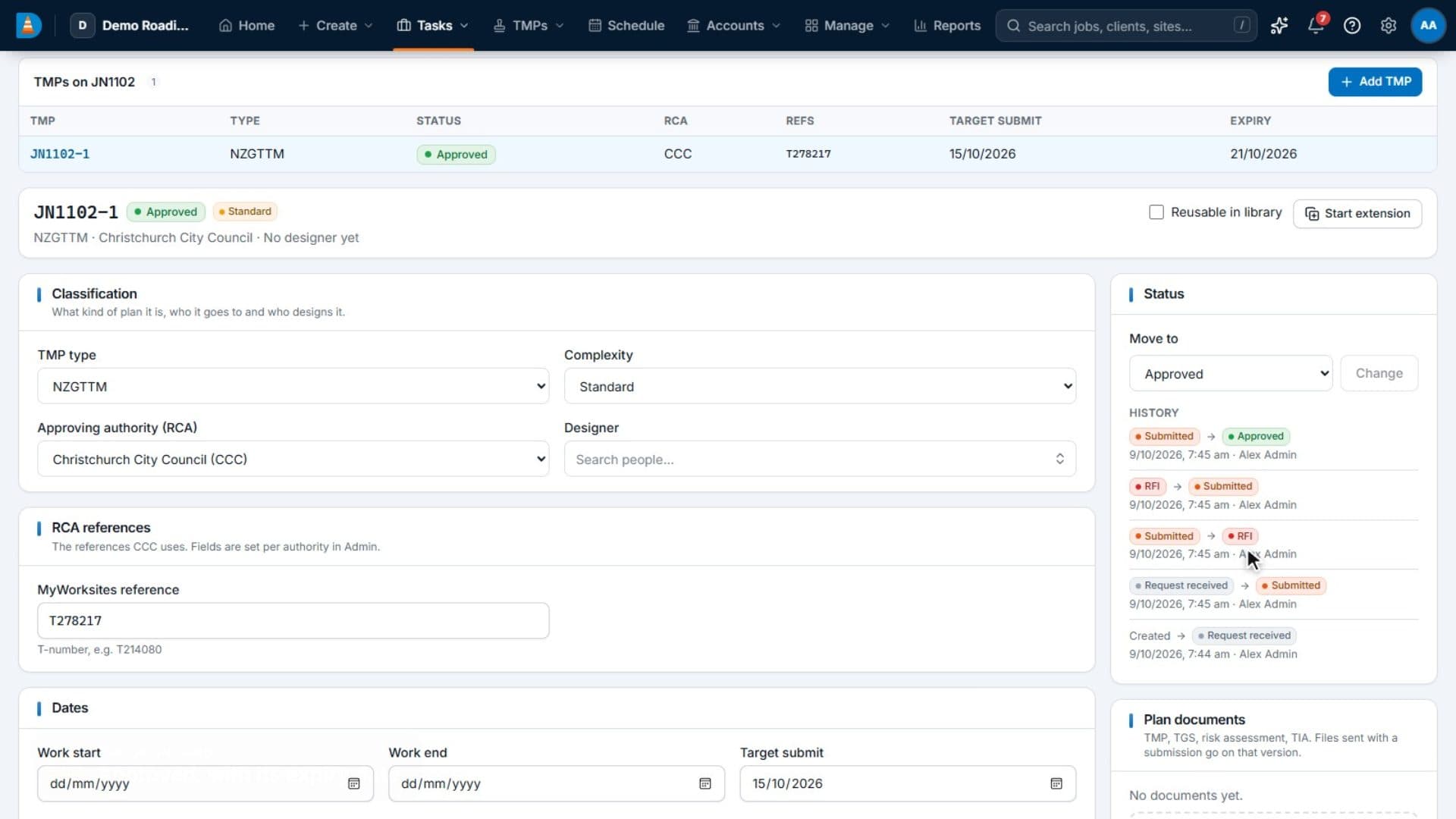
Record each version as you submit it. The RCA's reference fields, such as the MyWorksites T-number or Submitica CAR number, stay on the plan.Record the outcome
Mark the version approved, RFI or declined, with the RCA's comments and reasons. Then start the next version and resubmit.Watch the expiry
Approval sets the approval and expiry dates. The expiry queue shows the bookings that rely on each plan and starts an extension in one click.
See it work
Watch it in the real app
Key capabilities
What it does
- A TMP Dashboard with counts for requests, submitted, approved, overdue, due in 7 days, open RFIs and plans expiring in 30 days, plus a "needs attention" view.
- Reference fields set per RCA, such as the MyWorksites reference or the Submitica CAR number. New companies start with a list of RCAs. Edit them or add your own.
- Versions v1, v2 and so on, each with its outcome, the RCA's comments and reasons such as worker safety, sign or VMS placement, or insufficient detail.
- TMP types for your local standards, such as CoPTTM, NZGTTM and Austroads, plus Road Space Booking, Revision and Extension, and complexity levels, all editable.
- An expiry queue showing the bookings that rely on each plan, with one-click extensions.
- A library of completed plans, searchable by road, RCA and client, for repeat sites.
- Designer workload: assigned, in progress, due this week and hours.
- Reports on TMP turnaround by RCA, and on declines and RFIs by reason.
Good to know: ProTTM doesn't submit plans to MyWorksites or Submitica. You submit in the RCA's portal as you do now, then record the reference and outcome in ProTTM.
Questions
Common questions
Does it submit our TMPs to MyWorksites or Submitica?
No. You submit in the RCA's portal as you do now. ProTTM records each version, the portal's reference (such as the MyWorksites T-number or Submitica CAR number) and the RCA's outcome, so the history stays on the job.
Which RCAs are set up?
New companies start with a list of RCAs, with the reference field each one uses, such as the MyWorksites reference or the Submitica CAR number.
You can edit the list, add other RCAs, and set the reference fields each one uses.
Does it handle a move between TMP standards, such as CoPTTM to NZGTTM?
Yes, and both can run side by side. CoPTTM and NZGTTM are separate TMP types, so the TMP Dashboard shows which standard each plan uses. Each has its own design work type and chargeout rate.
There's a starter NZGTTM awareness competency to record who has been briefed, and a Risk Control Plan starter form with hazards and controls from your risk templates. You can rename or extend all of these.
On the same job
Works with
Tasks & job inbox
Every shift, email, hour and invoice line for a job stays on one record.
Scheduling & crews
People and vehicles by day, with clashes, tickets, leave and fatigue checked as you book.
Reports, dashboard & API
A home dashboard for each role, reports with exports, and a read-only API for your TV board and tools.