Skip to content
Built in Christchurch for NZ TTM

One system for TTM companies that design and deliver.

ProTTM keeps the TMP register, crew and plant schedule, field app, forms, timesheets and Xero invoicing on the same job, so the office and the road work from one page.

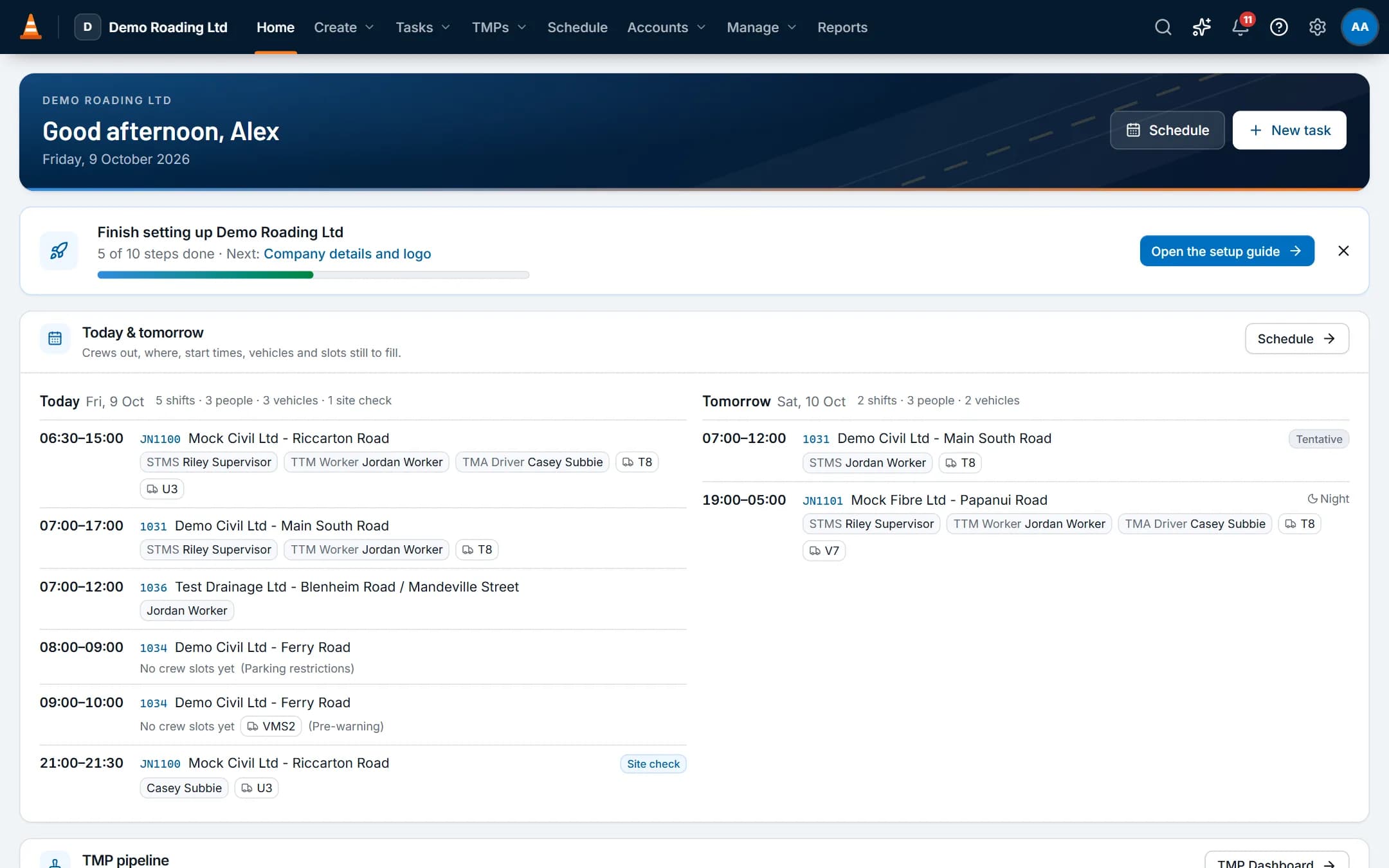
ProTTM home dashboard: today's and tomorrow's crews, slots still to fill, and the TMP pipeline
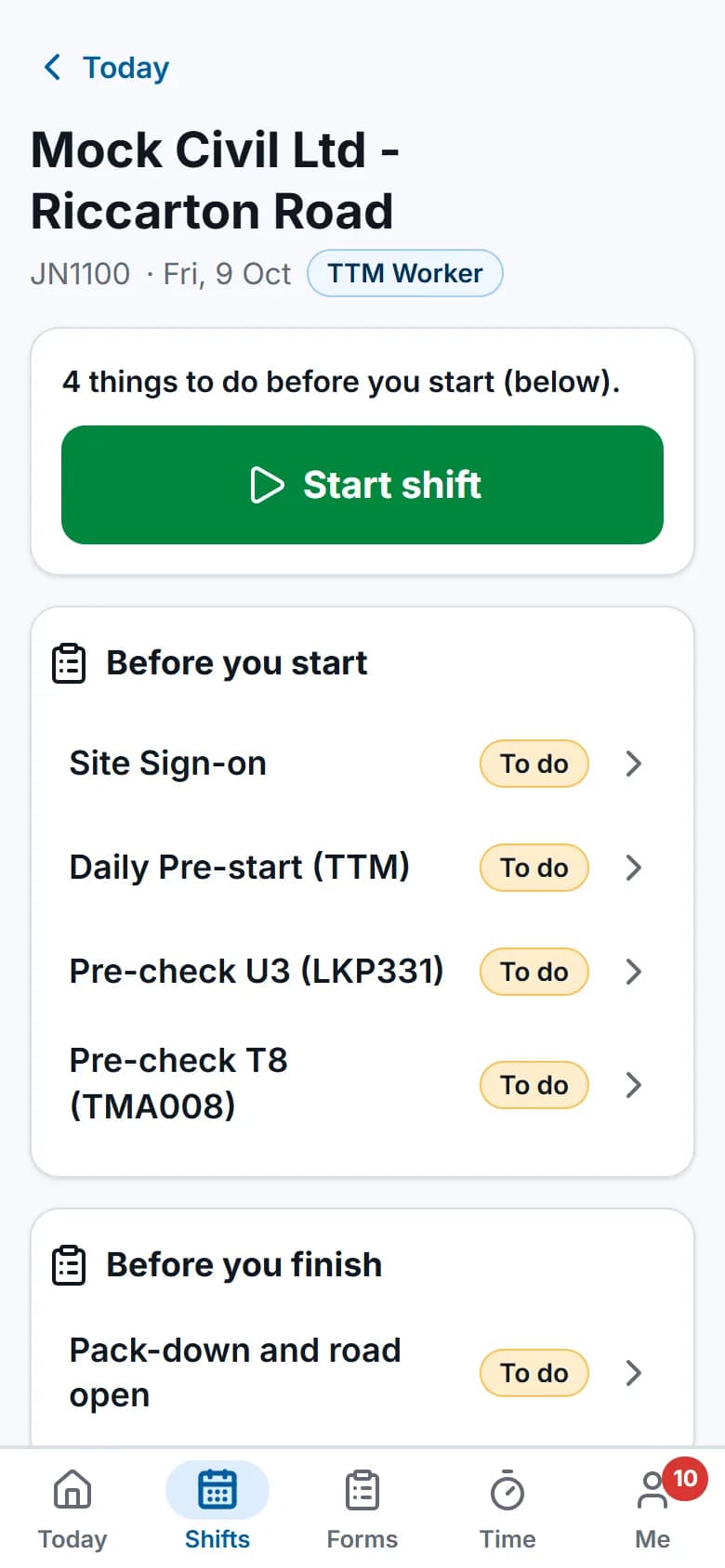
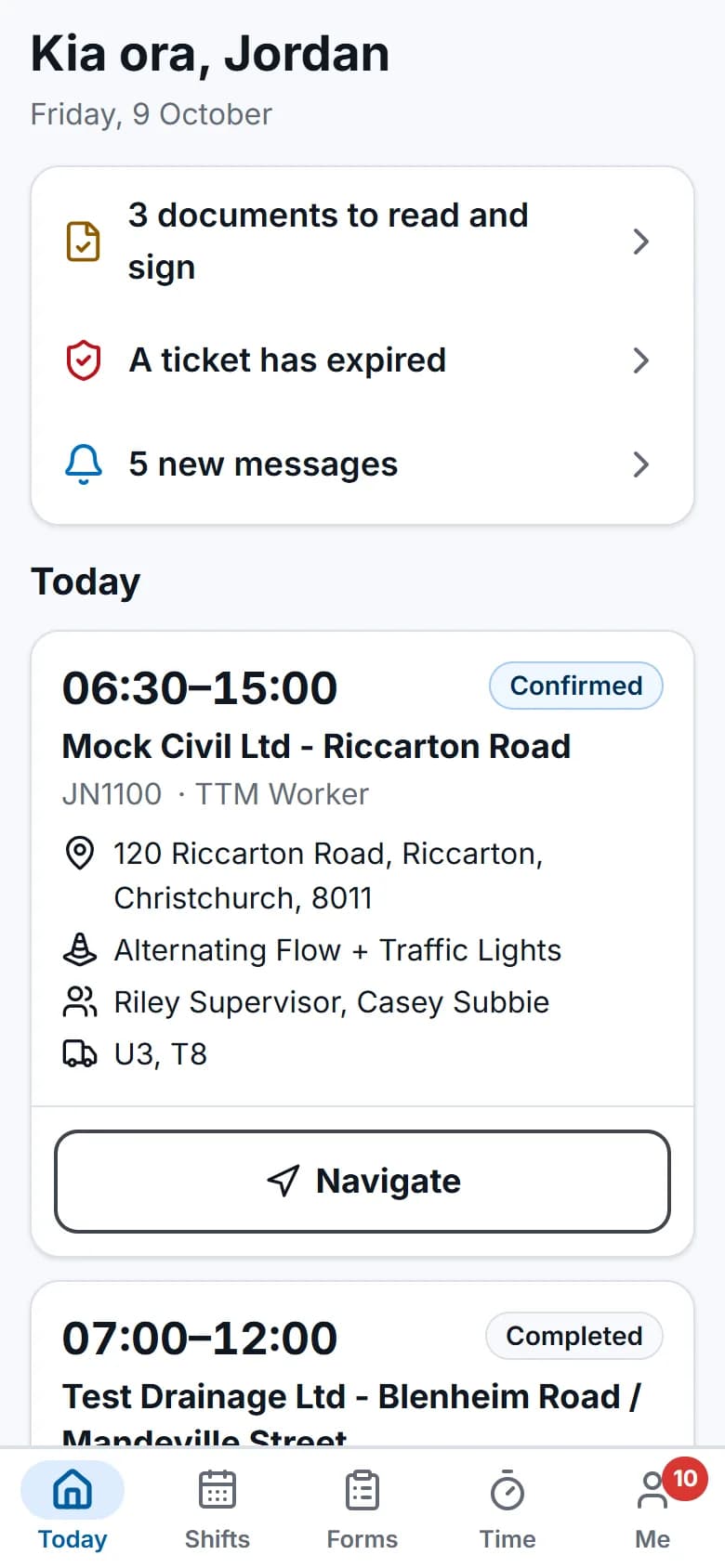
Field app on a phone: today's shift, documents to sign and an expired ticket alert

Screens show the real app with fictional demo data.

How a job runs

One job record, from the plan request to the paid invoice

Each step happens on the same task, so everyone sees the whole job at the level their role allows.
  1. The request becomes a task

    A plan request or a job comes in. One task holds it from then on, with its own email address for the job's correspondence.
  2. The plan goes to the RCA

    Design the TMP, submit it in the RCA's portal, and keep its reference numbers, RFIs and approval on the plan.
  3. Crew and plant are booked

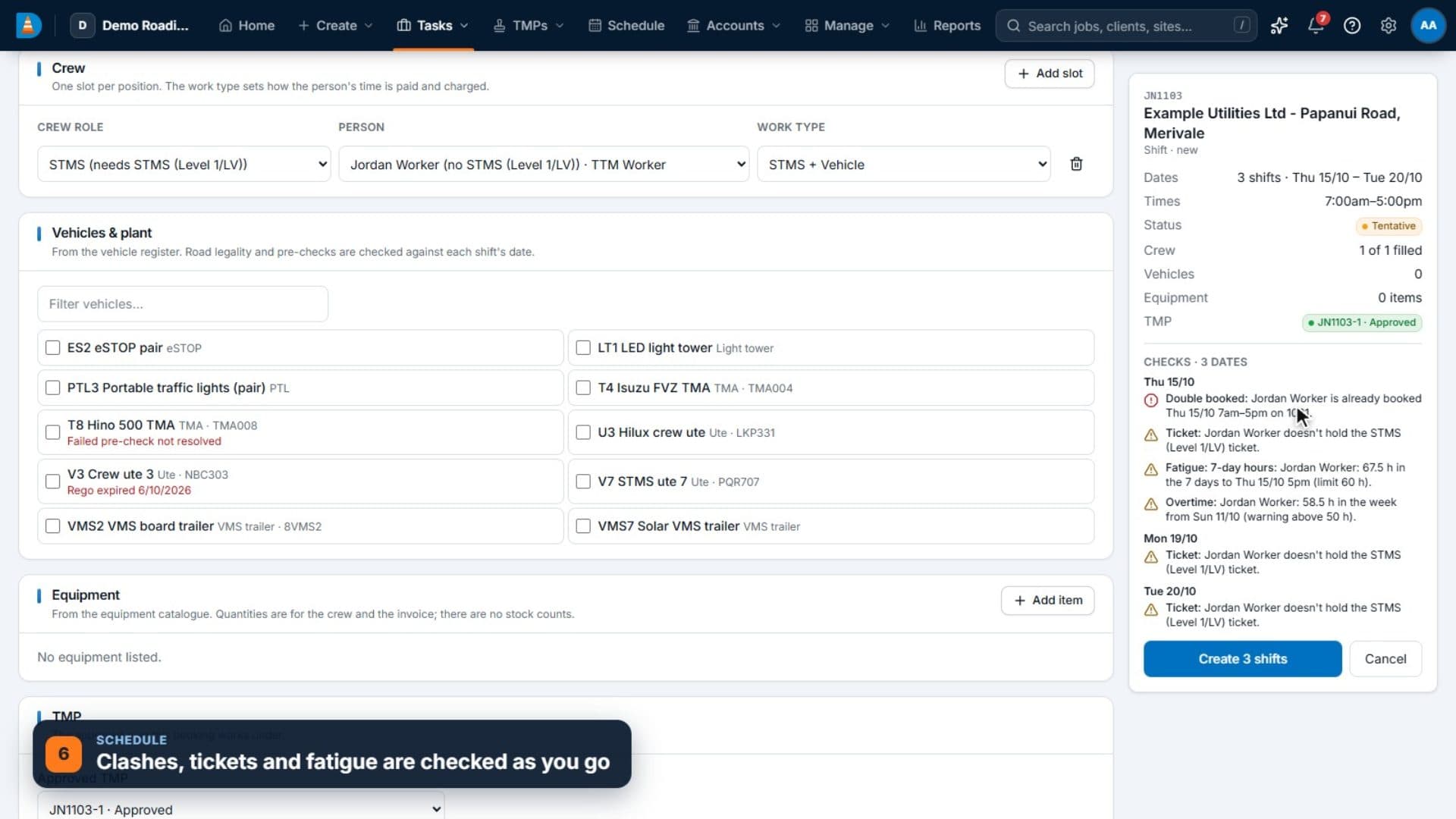
    Drag people, TMAs and equipment onto the board. Clashes, tickets and fatigue are checked as you go.
  4. The crew works the shift

    The field app has the shift, the approved TMP and TGS, and the forms, even without signal.
  5. Time becomes an invoice

    Approved time and hire are priced from your rate cards and sent to Xero.

Product tour

See it work in the real app

Short recordings of the screens your team would use. They have no sound, and the companies and people in them are fictional demo data.

Tasks & job inbox

Tasks, each with its own job inbox

One record per job, worked for weeks: every shift, email, hour and invoice line stays on it.
  • Headed "Client - Location" and numbered from one sequence with your own prefix and start number. Numbers are never reused.
  • Five task types, Design, Delivery, Design & Delivery, Hire and Non-billable, each with its own editable statuses.
  • A task page with Overview, TMP, Bookings, Time, Costs & billing, Files, Notes, Emails and History tabs.
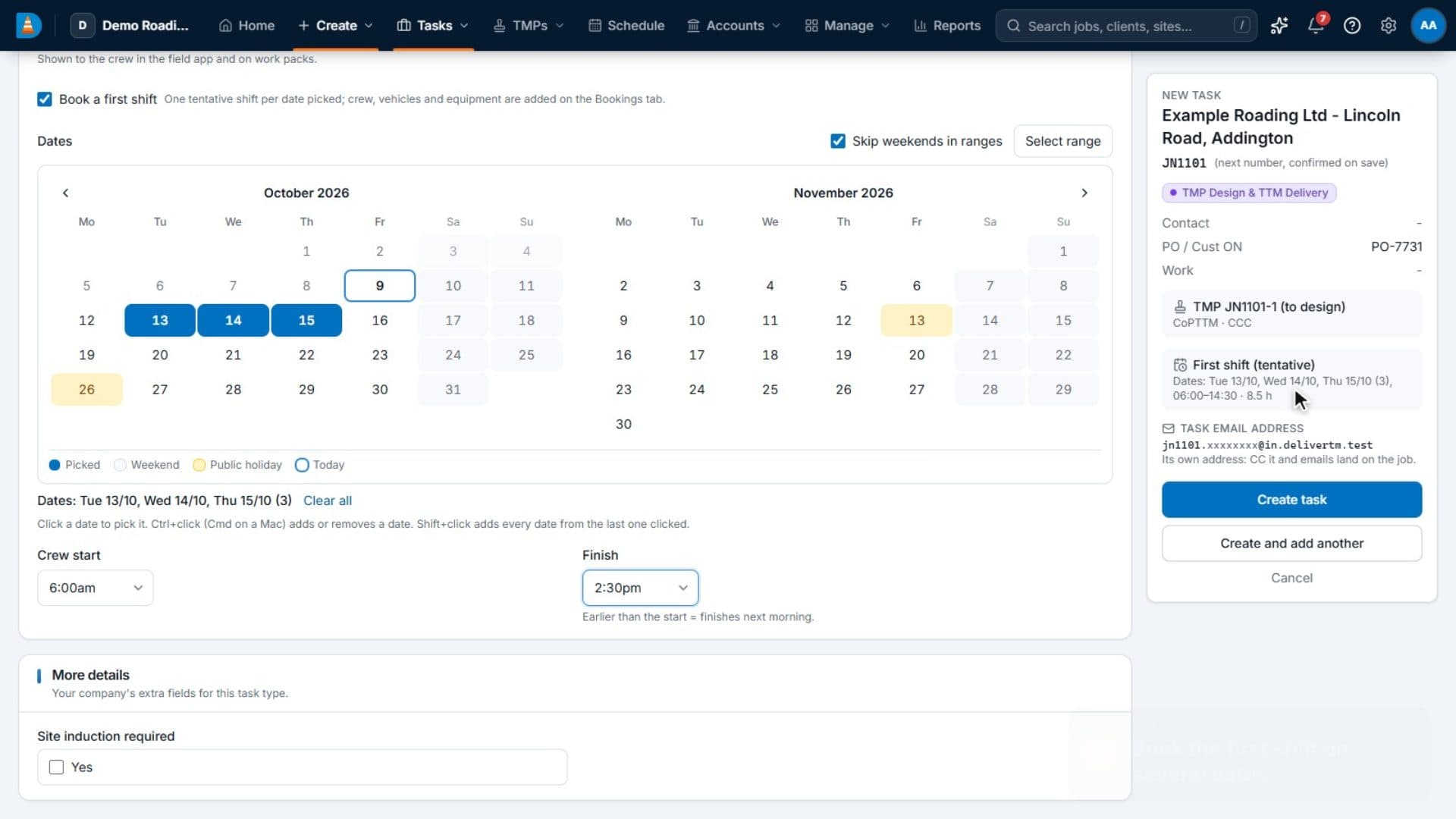
Creating a task: a still from the demo video
Creating a task. A new task is created on one page: the task type, the client and the location, with the summary panel filling in as the answers go in.

TMP register & RCA tracking

Every TMP, every RCA and every reference number

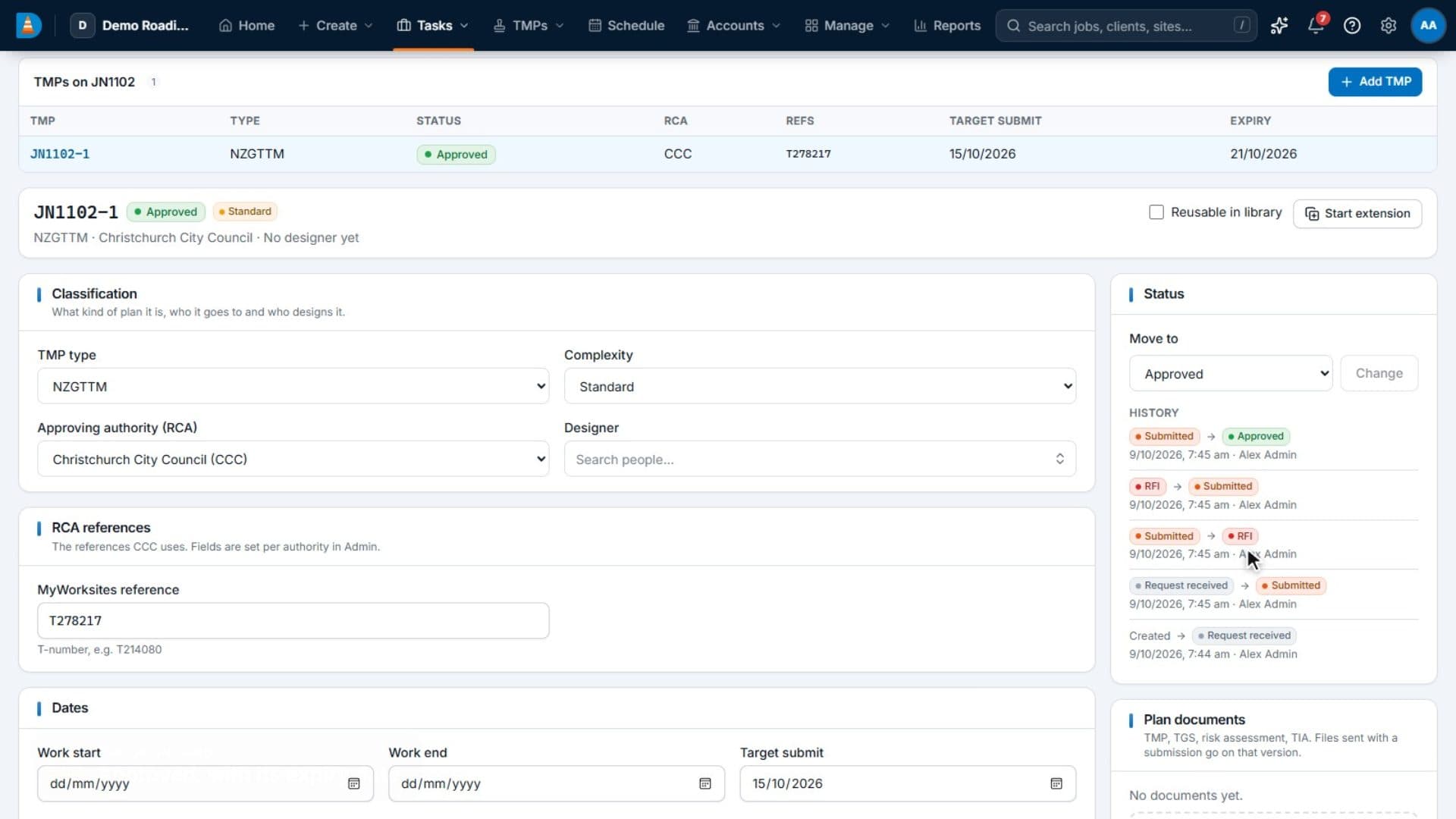
Every plan from request to approval and expiry, with the reference numbers each RCA uses.
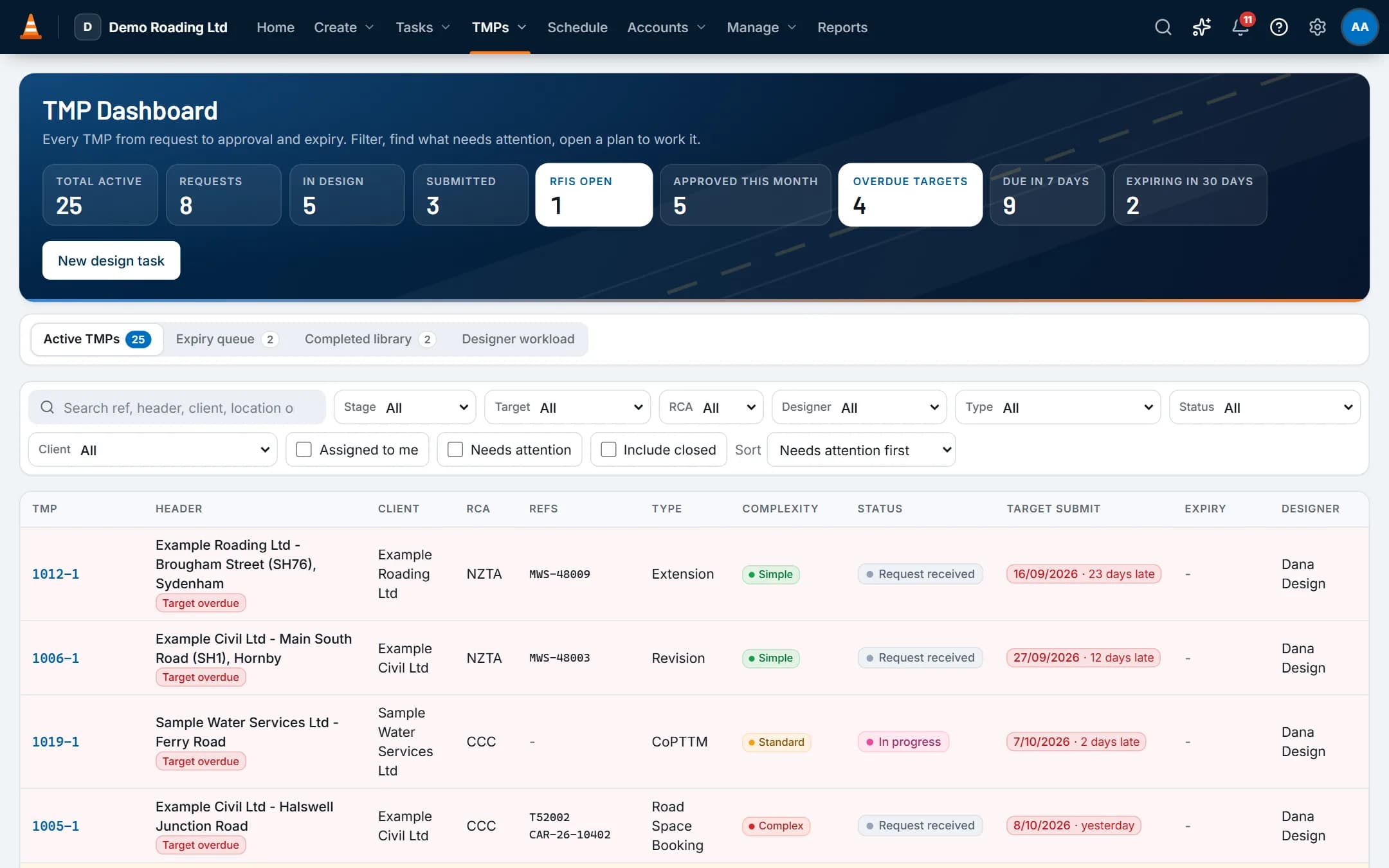
  • A TMP Dashboard with counts for requests, submitted, approved, overdue targets, due in 7 days, open RFIs and plans expiring in 30 days, plus a "needs attention" view.
  • Reference fields set per RCA. New companies start with Christchurch City Council, NZTA, Selwyn District Council and Auckland Transport (MyWorksites reference) and Waimakariri District Council (Submitica CAR number). Edit them or add your own.
  • Versions v1, v2 and on, each with its outcome, the RCA's comments and reasons such as worker safety, sign or VMS placement, or insufficient detail.
The TMP Dashboard: a still from the demo video
The TMP Dashboard. The TMP Dashboard with its counts, the plans that need attention, each plan's RCA and reference numbers, and the expiry queue.

Scheduling & crews

Crew, vehicle and equipment scheduling, with fatigue rules

People and vehicles by day, with clashes, tickets, leave and fatigue checked as you book.
  • Board periods of a day, 5 days, a week, 2 weeks or a month, with colour-by, card fields and saved views for yourself or the whole company.
  • Holding rows for unassigned STMS, unassigned jobs, site checks, parking restrictions and pre-warning.
  • NZ fatigue defaults you can change: a shift over 12 hours, a break under 10 hours, over 60 hours in 7 days, or more than 13 days in a row.
The schedule board: a still from the demo video
The schedule board. Crews and vehicles by day on the schedule board, with holding rows, and a booking assigned to a person with its conflicts checked.

Forms & inspections

Forms and inspections that know the job

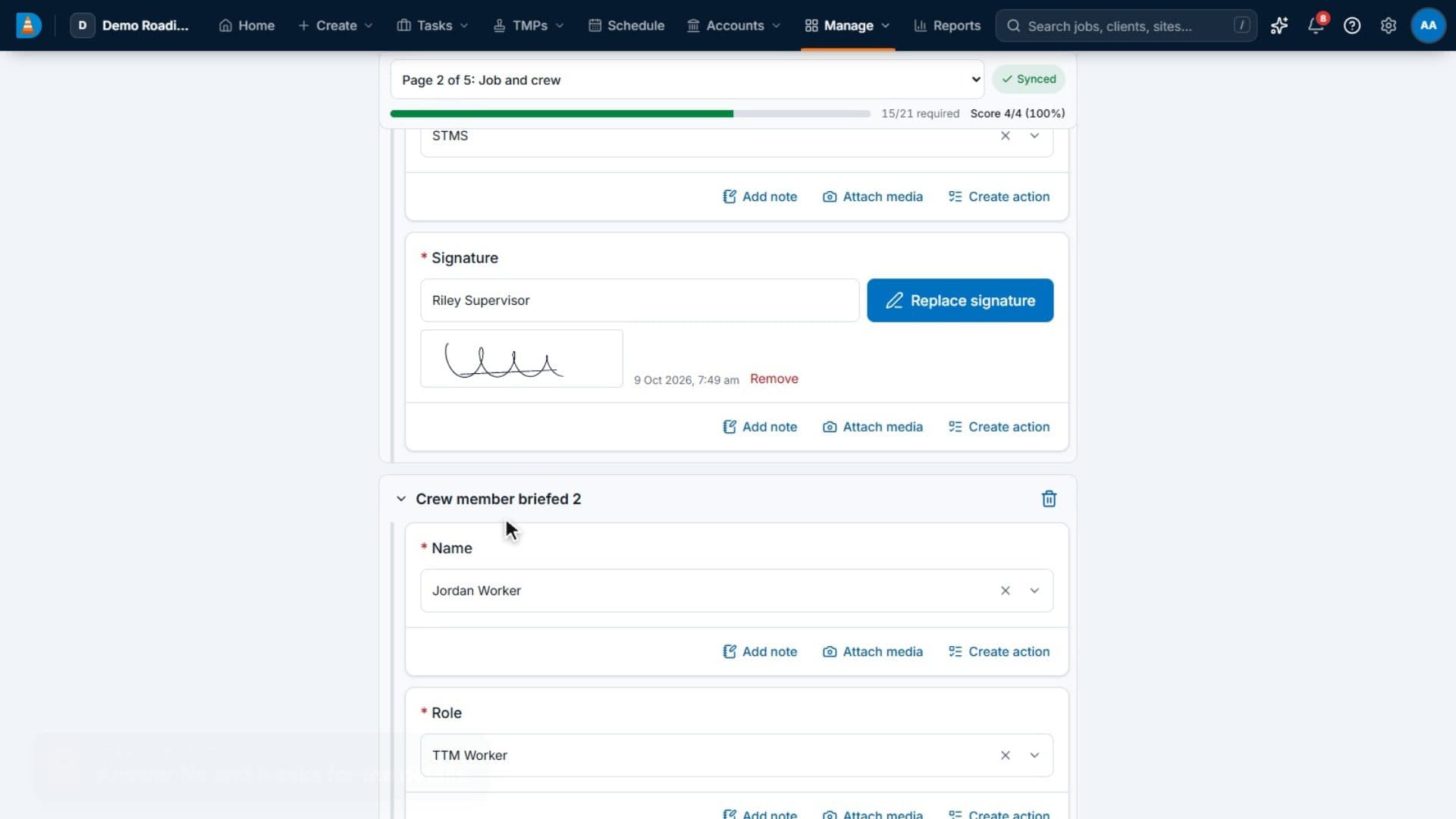
Sign-ons, pre-starts, set-up checks and incident forms that fill in the job details themselves.
  • 19 answer types, including multiple choice, photos and media, photo annotation, signature, location, slider, person, vehicle, site, job details, and hazards and controls from your risk templates.
  • Repeating sections, scoring and flagged answers.
  • Schedules that create inspections on a regular cycle and assign them.
Completing an inspection: a still from the demo video
Completing an inspection. An inspection started from the job, with its details filled in, answered question by question, then completed.

Invoicing & Xero

Approved time becomes invoices, and Xero stays in step

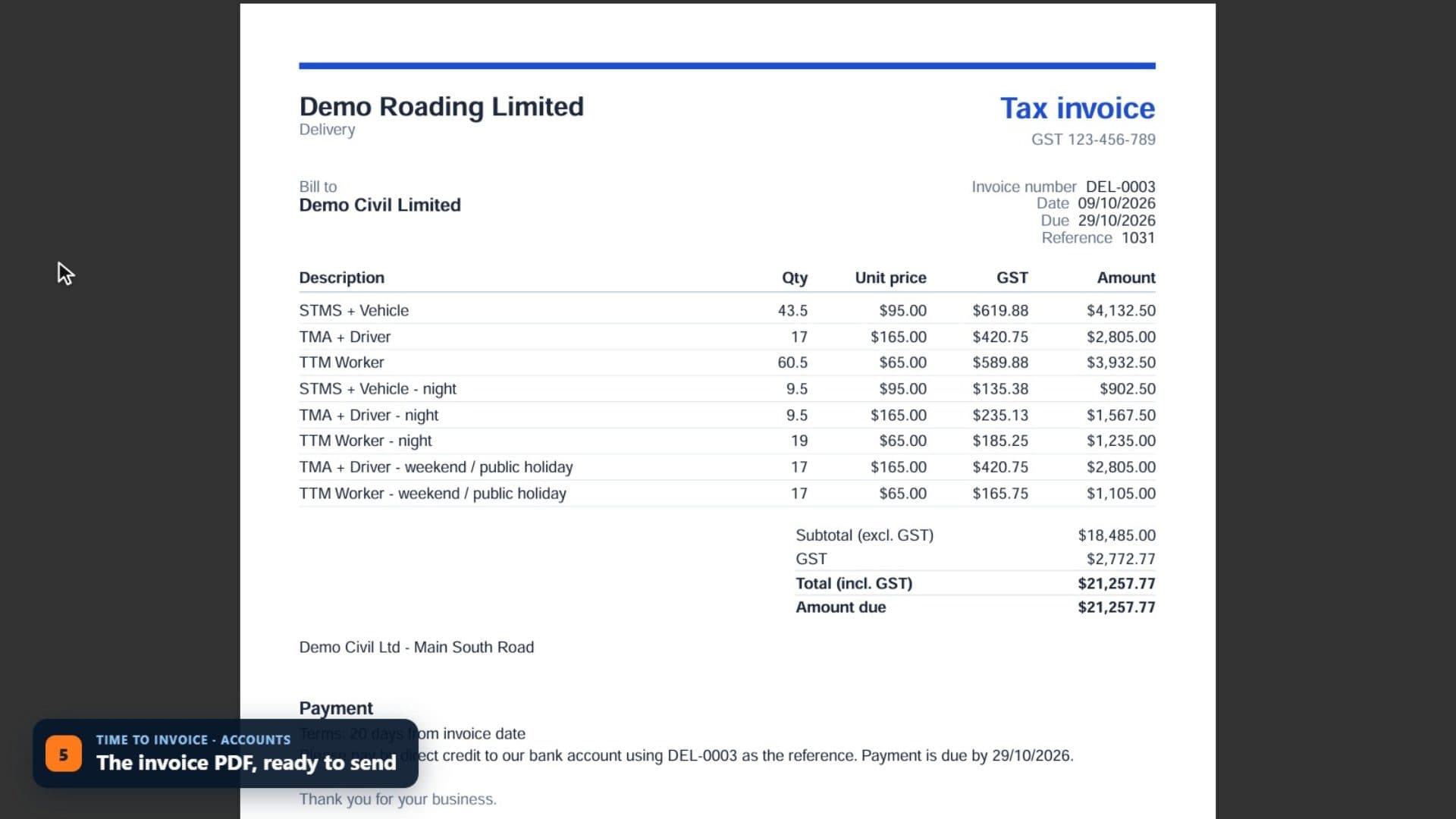
Approved time and hire priced by your rate cards, sent to Xero, with payments coming back.
  • Design charged hourly by work type, delivery hourly by crew role with minimums and night and weekend rates, and equipment hire by the day.
  • Credit notes for all or part of an invoice, and voids.
  • GST 15%, zero-rated and exempt tax codes mapped to Xero tax types, and each work type mapped to a Xero account and item code.
From approved time to an invoice: a still from the demo video
From approved time to an invoice. Timesheets approved, then the approved work collected in Ready to invoice and turned into an invoice priced from the client's rate card.

Field app (offline)

A field app that works without signal

Shifts, plans, forms, photos and time on the phone, synced when coverage returns. It runs in the phone's browser, so there's nothing to install from an app store.
  • Today's and upcoming shifts, with site details and directions.
  • Approved TMP and TGS PDFs kept on the phone for today's and tomorrow's shifts.
  • Clock on and off, add time by hand, and submit the timesheet.
  • Photos are shrunk on the phone before they're sent, so they get through on a weak signal.
The field app on a phone: a still from the demo video
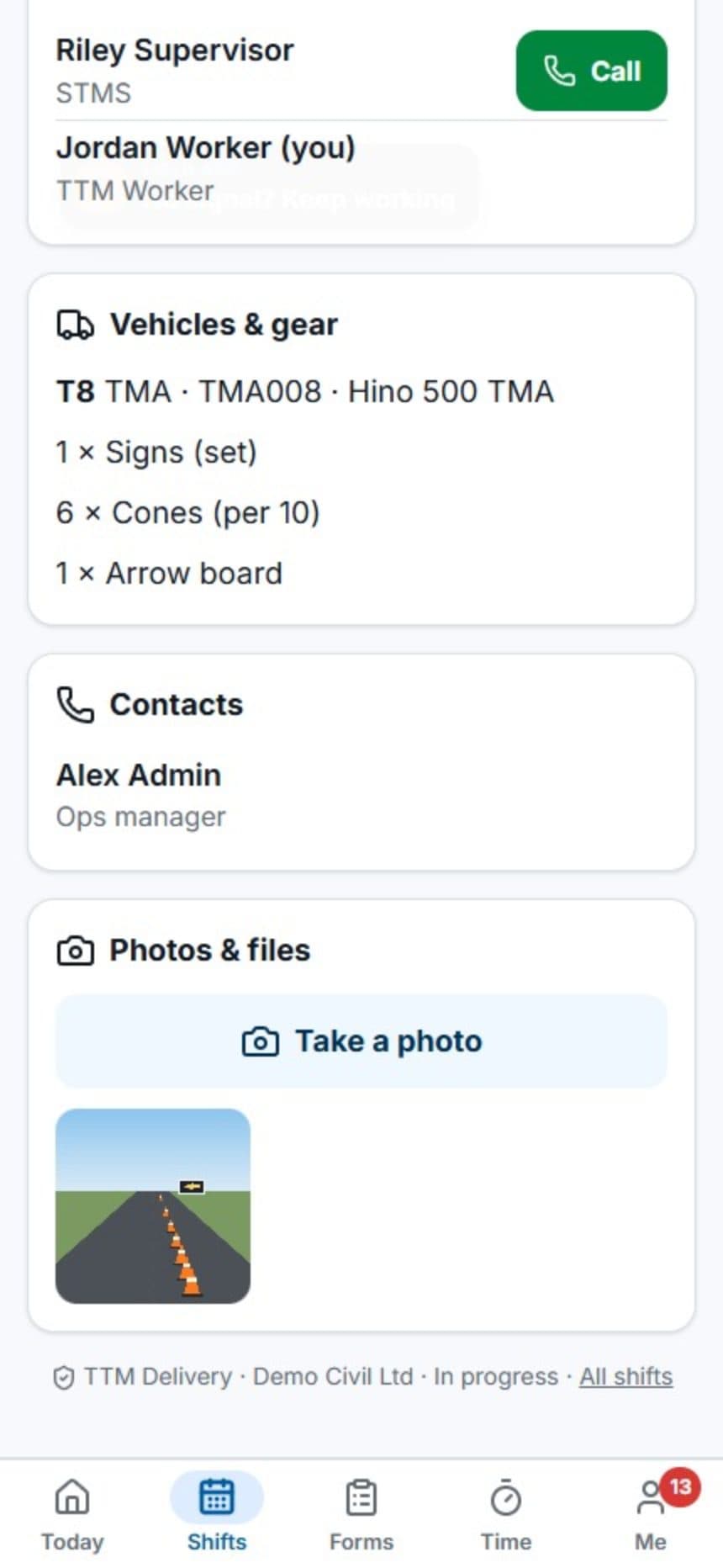
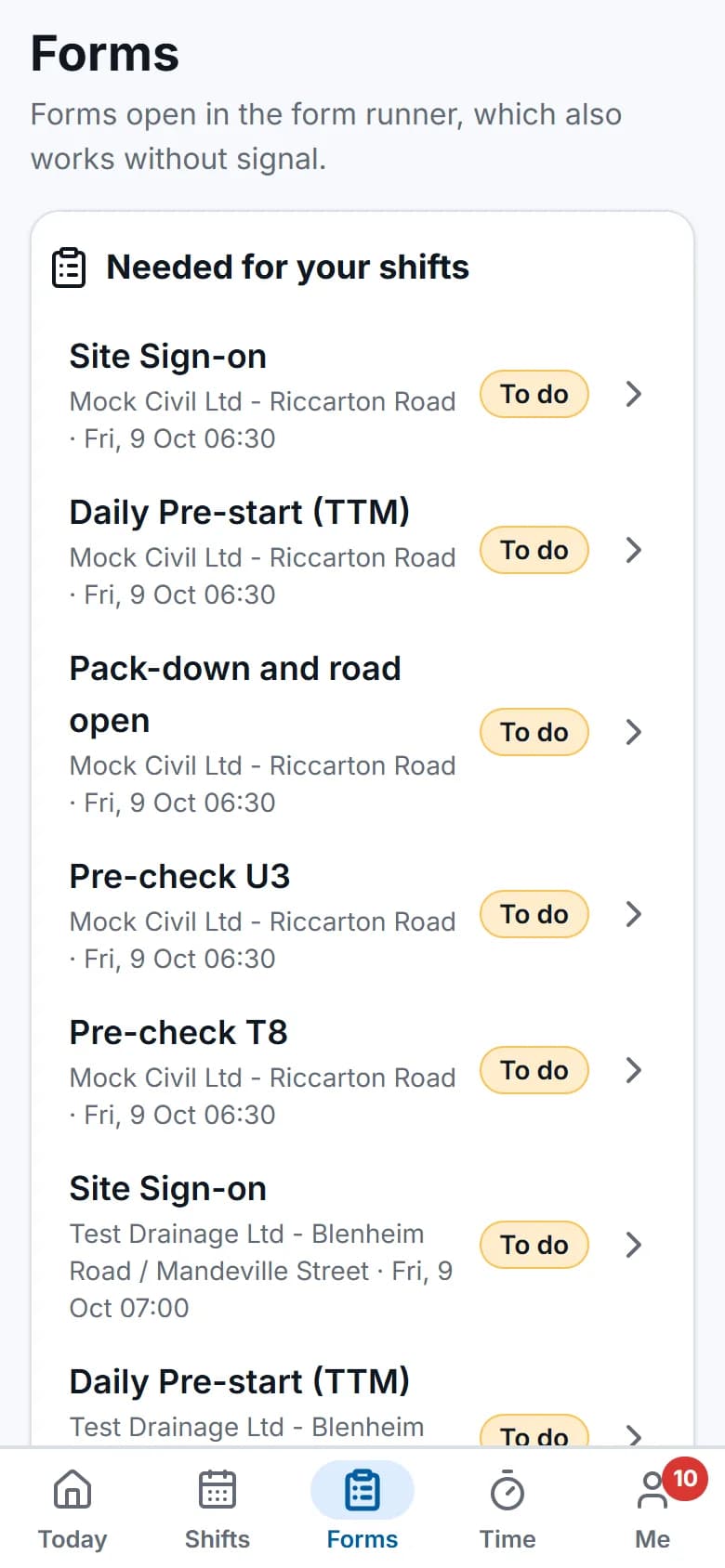
The field app on a phone. A crew member's day in the field app: today's shift, the site and the approved plans, the forms to do, and starting the shift.

The field app on a phone, recorded with fictional demo data.

Everything in it

Everything a design-and-deliver company runs on

Product overview
  • TMP register & RCA tracking

    Every plan from request to approval and expiry, with the reference numbers each RCA uses.
  • Tasks & job inbox

    One record per job, worked for weeks: every shift, email, hour and invoice line stays on it.
  • Scheduling & crews

    People and vehicles by day, with clashes, tickets, leave and fatigue checked as you book.
  • Field app (offline)

    Shifts, plans, forms, photos and time on the phone, synced when coverage returns.
  • Forms & inspections

    Sign-ons, pre-starts, set-up checks and incident forms that fill in the job details themselves.
  • Timesheets & payroll

    Time comes from the bookings and the field app, is approved once, then goes to payroll and invoices.
  • Invoicing & Xero

    Approved time and hire priced by your rate cards, sent to Xero, with payments coming back.
  • Compliance

    Who holds which ticket, which vehicles are fit for the road, and who has read the latest procedure.
  • Reports, dashboard & API

    A home dashboard for each role, reports with exports, and a read-only API for your TV board and tools.

Made for the trade

Built in Christchurch by someone who has done the work

ProTTM is built by someone who has designed TMPs and run crews on the road, for any New Zealand TTM company. Anything specific to your company is a setting, not a workaround.

It speaks your language

  • TMP
  • TGS
  • STMS
  • TMA
  • RCA
  • CAR
  • T-number
  • CoPTTM
  • NZGTTM
  • RFI
  • WOF
  • COF
  • RUC

Task types, statuses, RCAs and their reference fields, TMP types, crew roles, work types and forms all start set up for TTM, and every one is yours to change.

Built to be trusted with your jobs

The things a TTM company should ask of any system that holds its clients, crews and invoices.

  • Your data kept apartEach company's records are separated in the database itself, not just in the screens.
  • Two-factor sign-inAuthenticator-app codes and backup codes, and a company can require them for chosen roles.
  • Every change recordedAn audit log shows who changed what and when, on every record.
  • Roles that fitField staff and subcontractors see only their own work. Office roles see their business units.

Questions

Good questions, straight answers

What TTM companies ask us first. There's more on the FAQ page.

All questions
Does the field app work without signal?

Yes. Each person's phone keeps their shifts from the past week and the next two weeks, with the site details and the approved TMP and TGS PDFs for today's and tomorrow's shifts.

Starting and finishing shifts, time, photos, forms, vehicle pre-checks and document sign-offs are saved on the phone first. They're sent when the phone is back in coverage, oldest first and each exactly once.

We use AroFlo. Can we bring our data across?

Yes. The AroFlo import reads AroFlo through its API and brings across clients, locations, task types (with AroFlo statuses matched to yours), tasks with their AroFlo job numbers, TMP details (type, complexity, RCA and T-number), work types, time entries and invoices.

Start with a dry run. It shows exactly what would be created, updated or skipped, without saving anything. Then run the import.

Does it submit our TMPs to MyWorksites or Submitica?

No. You submit plans in the RCA's portal as you do now. ProTTM records each version you submit, the reference the portal gives you (such as the MyWorksites T-number or the Submitica CAR number) and the RCA's outcome, so the whole history sits on the job.

Does it work with Xero?

Yes. Connect your Xero organisation in Admin. Clients become Xero contacts, approved invoices and credit notes go to Xero as drafts or approved (your choice), and payments come back every hour, or straight away if Xero's webhook is set up.

Each work type maps to a Xero account and item code, and GST 15%, zero-rated and exempt map to Xero's tax types.

Where is our data held?

Your company's records are kept in ProTTM's PostgreSQL database. They're separated from every other company's records by row-level security in the database itself, not only in the screens.

Files such as plans, photos and email attachments are only opened after a check that the person can see the record the file belongs to. Ask us in your demo for the hosting provider and region.

How much does ProTTM cost?

NZ$14.99 per user per month, plus GST, with every module included. There is no platform fee, no setup fee and nothing to add on. Each month you're billed for the people in your company who signed in to or used ProTTM that month, so casual crew who didn't work aren't charged. Month to month, no lock-in.

See it with your own kind of work

Book a demo and we'll walk through a job from TMP request to invoice, on the real app.